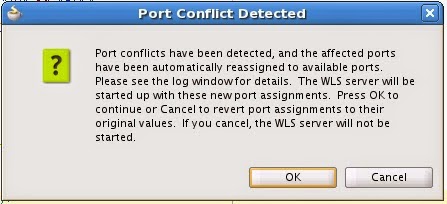
jdeveloper will automatically assign the next available port to the integrated WLS. But then you might want to change the port for good so that a random port is not assigned every time the WLS is run.
Wednesday, February 25, 2015
Configuring Port of Integrated WebLogic Server
jdeveloper will automatically assign the next available port to the integrated WLS. But then you might want to change the port for good so that a random port is not assigned every time the WLS is run.
Friday, July 23, 2010
portats and portlets
Friday, May 28, 2010
Uploading Files: ADF InputFile Component
Tuesday, May 25, 2010
base64 encoding for attachments in a web service
Downloading a File
<af:fileDownloadActionListener method="#{ConstituentData_BackingBean.handleFilekDownload}"filename="#{row.bindings.UserFileName.inputValue}"contentType="#{row.bindings.FileType.inputValue}"/>
try {Object result = executeMethodWithResult("getCachedAttachment");outputStream.write((byte[])result);} catch (IOException e) {System.out.println("Exception "+e);}
Thursday, May 6, 2010
af:iterator component
Monday, May 3, 2010
XMLGregorianCalendar and Date conversions
Sunday, April 25, 2010
Framework Extension Classes
One of the benefits of working with a framework is the ability to extend the framework classes to get a built in feature to work differently or enhanced / enrich its behaviour and utilise it all across the application.
- To augument a built in feature
- change how a built in feature works
- workaround a bug in the built in feature
Extending the class is pretty straightforward. Just create a new class and use extends keyword to make it extend the old class.
Including extended classes:
you can created extended classes in a separate project. If you have done that then you would have to include the project which contains the extended classes as a dependency of you project. Go to dependencies property in your project properties and add the extended claasses project in there.
if you have packaged the extended classes in a JAR file then create a named library definition to reference the JAR file and also list the library in library list of the project where you need these extended classes.
Getting ADF components to use the extended classes: For each ADF component there is a java page on the wizard. Here you can choose the base class that you want to extend and create an extended classes that can be used by the component.
Multiple levels of extension classes. In practice there can be and probably will be multiple levels of extension classes which are created for a an application. Some generic functionality is added or altered at the application level and hence an ApplicationCustomAppModuleImpl is created. Furthere there may be a need to add or alter some features at the project level. So ProjectCustomAppModuleImpl will extend ApplicationCustomAppModuleImpl. And at the application module level MyAMAppModuleImpl will extend ProjectCustomAppModuleImpl.
By default defining fwk extension classes for all new components: If you want to use a specific set of base classes upon which the custom classes for your project components should be based then you can define it in project properties > business components > base classes
You can also specify the extension classes for all new projects by going to Tools > Preferences > business components > base classes
Its always a good idea to create customised extension classes for your project or application at the very beginning. As you start writing you very first lines of code you might not have a need for any generic code. Nor you may fathom a requirement in the future. But quite frequently as the application begins to take shape you will come across bits and pieces that you would think can be shared across you various code components. By then it would involve a lot of effort to extend all you existing classes on a new class. So its a good idea to create a set of custom extension classes right at the beginning and add code to them as and when required.
A common set of customized framework base classes in a package name of your own choosing like com.yourcompany.adfextensions, each importing the oracle.jbo.server.* package, would consist of the following classes:
- public class CustomEntityImpl extends EntityImpl
- public class CustomEntityDefImpl extends EntityDefImpl
- public class CustomViewObjectImpl extends ViewObjectImpl
- public class CustomViewRowImpl extends ViewRowImpl
- public class CustomApplicationModuleImpl extends ApplicationModuleImpl
- public class CustomDBTransactionImpl extends DBTransactionImpl2
- public class CustomDatabaseTransactionFactory extends DatabaseTransactionFactory
For completeness, you may also want to create customized framework classes for the following classes as well, note however that overriding anything in these classes would be a fairly rare requirement.
- public class CustomViewDefImpl extends ViewDefImpl
- public class CustomEntityCache extends EntityCache
- public class CustomApplicationModuleDefImpl extends ApplicationModuleDefImpl
It is best to package these framework extension class in a JAR file so that they can be used across projects and applications.
Named libraries are a convenient way to use these JAR files in your code.
Reference:
http://download.oracle.com/docs/cd/E15523_01/web.1111/b31974/bcadvgen.htm#insertedID0
Wednesday, April 21, 2010
Username Token security call on web service
SAD_ADMISSIONS sAD_ADMISSIONS;
SADCREATEAPPLRESP respCreateAppl = new SADCREATEAPPLRESP();
System.out.println("Before Try..in Create Appl");
try {
// Security Policy is set to User Name Token
SecurityPolicyFeature[] securityFeatures =
new SecurityPolicyFeature[] { new SecurityPolicyFeature("oracle/wss_username_token_client_policy") };
sAD_ADMISSIONS = new SAD_ADMISSIONS();
// port object is created passing in the security policy
SAD_ADMISSIONS_PortType sAD_ADMISSIONS_PortType = sAD_ADMISSIONS.getSAD_ADMISSIONS_Port(securityFeatures);
// request context object created
Map
SAD_ADMISSIONS_PortClient.setPortCredentialProviderList(requestContext);
System.out.println("Username/password:" + username + "/" +password);
requestContext.put(BindingProvider.USERNAME_PROPERTY, username);
requestContext.put(BindingProvider.PASSWORD_PROPERTY, password);
// service operation called
respCreateAppl = sAD_ADMISSIONS_PortType.sadCREATEAPPL(reqCreateAppl);
} catch (Exception ex) {
ex.printStackTrace();
}
Saturday, April 3, 2010
Working with a Non Database AM
Thursday, February 11, 2010
ADF - Customizations and Personalizations
Personalisation: Is the ability by the end user to change the look and feel of the application per their preferences. Like re-arranging, hiding columns in a table. Hiding or showing a detailed region, etc. Personalisations can persist within the same user sessions or can be configured to persist along user sessions.
Customisation (Seeded changes): Allow for design time customisation of a generic for specific sites or industries. These are done in jdeveloper using the customisation role. Its part of the deployment process.
Design time at Runtime: It is also possible to have a design time experience at runtime where administrators and analysts can used advanced components to create and model pages for the end user without the need for writing any code. This feature is provided by web centre which is a separately licensed product. We will not discuss that here since this comes in the domain of web 2.0 domain which has many other more powerful and useful features to exploit from.
Topics to be covered
- Customizing the appearance using style and skins
- behaviour of widgets that show detail information (typically with a plus sign) can be changed to hide or show the detail by default.
- Panel splitter can be resized or collapsed.
- In a Calendar the view mode, whether year, month or week can switched. Active day can be selected
- Columns in a table can be re-ordered, frozen, visible, hidden, width changed. etc
The application can be configured to allow user personalisation changes to persist within the same user session or across sessions.
- Same User Session: Any changes that the user makes to the application will persist throughout the session. If they log off and log in again then the changes will be lost and they will the see the UI in the default mode. The application has to be configured to allow session persistence. If allowed then all component behviourial properties that can be persisted will be persisted for the session. You cannot choose specific ones to allow persistance for the session.
- Across Sessions (MDS persistance) : The application can be configured to allow changes to certain type of changes to certain widgets to persist across user sessions. At design time it can be decided that changes to which behviourial property of which components should be allowed to persist across user session. In a sense the user preference is stored for good. The setting for the components and their properties can be overriden at individual instance of it. Which means that if a persistance change for a certain component's behaviour might not be allowed at the application level, but it can be allowed for the specific instance of that component on a particular page / UI. The component and their properties that are chosen for MDS persistance are recorded in adf-config.xml
Templates and Regions used across mutliple pages: Any changes made in properties of components on these behave as follows:
Session persistance: The changes made by the end user will only reflect on the page in whose context the change has been made.
MDS persistance: the changes made will appear on all pages that use the region or template.
This is because of a difference in the way the persistance is applied in either scenario.
To be covered: Implementing User Customisations (sections 35.5 and .6)
Most end user of generic applications (typically application products) like to customise the application to suite their specific needs both in terms of validations applicable and the appearance of the application. For example customer software teams implementing a generic application at different sites can have a different customisation for each of their sites. In addition customisations can also be done for group of users such as different appearance for user with different roles and responsibilities.
Static Customisation: Static customisation is the one where the applicable customisation is visible to all users of that application. For example a site level customisation will be meant for all users at that site.
Dynamic Customisation: Dynamic Customisation is the one where the customisation applies differently to different users using the same application. This differentiation can be based on user roles.
Layered approach to Customisations:
Customisations are defined and applied in a layered way making the whole process of customisation more modular and easier to manage. The base application can have multiple layers of customisations.
For example a first layer can be 'industry' where different set of customisation can be configured for different industries in which the application might be used. Hence a different customisation set can be defined for say 'financial' industry and a different one for 'healthcase' or 'education' etc. These are called the layer values (i.e. 'financial','education','healthcare').
The next layer could be the 'site' layer. Where different sites can have different customisations.
The one after that could be a dynamic customisation layer for a user group such as a user role. Different roles have different customisations applicable to them.
As is evident here the customisation is defined at a customisation layer value. Which means that a set of customisation modifications would be defined for example education industry, another one for a site in New York.
The final behaviour of an application for the end user would depend upon the different layers of customisation applicable for that user. Hence at runtime the base layer is picked up then each customisation layer is applied (in the sequence in which is defined in the cust-config section of adf-config.xml) to it, depending upon the layer values derived from the context in which the application is running and the specific user using it.
diagram
This layered approach to customisations keeps the customisations as upgrade safe. The base layer can change without impacting the customisation layers.
Note: I dont think all customisations can be performed in the layer approach. This can be studied more to identify instance of customisations that cannot be applied through this approach. But this is definetely a good first step to try make customisations isolated from the base application and make the process of upgrading the base app less of a pain for the customers
Customisations on ADF model and business components are applicable all across the app since they are loaded only once. They cannot be controlled to behave differently for different users.
Customisations on controller or view level cane be configured based upon user role. Examples: different sets of users can be shown different sets of fields based upon their role.
http://download.oracle.com/otn_hosted_doc/jdeveloper/111demos/mds/mds.html
Tuesday, December 22, 2009
ADF vs Adobe Flex
resources:
APEX (Oracle Application Express vs. ADF): points of difference can be relevant.
http://www.oraclecommunity.net/forum/topic/show?id=1988559:Topic:3677
Monday, December 21, 2009
Running ADF on different containers
Here is a starting point for this topic.
http://matthiaswessendorf.wordpress.com/2009/12/11/running-adf-on-different-containers/
Objective:
- develop an understanding on the options that are available to deploy a jdev application
- whether each component (adf, soa, web centre) have different needs
- ultimately present a proposal on how the customers can deploy the application with minimum additional investment.
the Jdev environment
This post should cover the following items:
- the Fusion environment: development and deployment
- what pieces are required for which features
- how much ram would each piece need
- what activities need to be performed on deployment.
Also to be addressed:
- why we need sample application
- why the sample application needs to be deployed. analysts
Tuesday, December 15, 2009
JSR 227 – Data Controls – Bindings
JSR 227 (Java Specification Request 227)
Aims at decoupling User Interface technology from the business service implementation.
It established a common API, and meta data format that will allow a standard way to bind data from a business service to UI components. This will allow a plug and play approach where any UI component can bind to any business service as long as they both implement the standard API. This not only simplifies development of RIA but encourage creation and easy adoptability of new types of UI components.
Oracle submitted JSR 227 in June 2003. The following companies supported it Apache, Apple, Borland, Cisco, Fujitsu, HP, Iona, Macromedia, Nokia, SAP, and Sun.
Oracle ADF implements these two concepts of JSR 227 through Data controls and Declarative bindings.
Data controls abstract the implementation technology of a business service by using standard metadata interfaces to describe the service's operations and data collections, including information about the properties, methods, and types involved.
Declarative bindings abstract the details of accessing data from data collections in a data control and of invoking its operations.
Reference: http://www.oracle.com/technology/products/jdev/htdocs/techinfo/jsr227.html
http://jcp.org/en/jsr/detail?id=227
Here is a good presentation by Duncan Mills on JSR 227
http://www.nljug.org/pages/events/content/jfall_2005/sessions/00016/slides.pdf/
ADF Faces briefly
As internet applications developed there was a greater value in having them behave like desktop applications. Vendors created RIA fwks that required users to install plugins to be able to use their features. As java web applications became more popular there was a need identified to have a standard view-layer framework. JCP (java community process) developer JSF as a UI standard for java web applications.
JSF being a part of the Java EE standard, vendors developed their own components that could run on any compliant application server. These components would be more sophisticated. Oracle developed a set of components called ADF Faces that exceeded the the functionality of standard JSF components and can run on any runtime implementation of JSF. Along with providing more complex components ADF faces also introduce partial page rendering (PPR) with AJAX.
Oracle has since donated the ADF Faces component libraray to Apache Software Foundation and is known as Apache MyFaces Trinidad.
AJAX (Asynchronous JavaScript and XML) is a set of technologies that allow for creation of interactive web applications. These technologies are implemented on the client side and enable the web page to retrieve data from the server, asynchronously in the background, without affective the display or state of the page. Data is usually retrieved using XMLHttpRequest object. Despite the name the user of JavaScript, XML is not actually required and the request might not necessarily be asynchronous.
About jdev application files
When a new Fusion Web Application (ADF) is created the following projects, directories and files appear. These are explained here
Wednesday, December 9, 2009
Understanding the Sample Application
In Standalone Example > Advanced UI Examples following two projects are there:
1. Cascade Lov Sample project
A Dependent LOV can be created. In this example if a different Country is selected then the states defined for that country will show up in the StateProvince field.
2. Multiple Record Return List project
Ability to define dependent fields. Changing the value for the master field, changes the values in the dependent fields.
In this example Ship To Address ID is the master field. Changing the value of the address id results in the address information getting changed.
Setting up a SOA schema
When using an Oracle XE database for hosting a fusion web application along with SOA.
Install the Universal edition (as against the Western Europe) edition of Oracle XE. The universal edition uses UTF8 character set which is recommended for SOA.
Once the database is installed you will have to change certain init param parameters. If not done the installer will crib about it and it might also fail.
Connect to the db using SQLPlus.
See the current value of the parameters by executing the commands as shown in the picture.
Alter the values of the parameters by executing the two command shown below.
Stop and restart the database;
Connect to it with SQLPlus.
Execute the show commands to check whether the parameter changes have taken effect.
Now you are all set to run the RCU and install the schemas.
Friday, December 4, 2009
Apache ant and ADF Sample project.
Apache ant is an tool that allows for automation of software build processes. It is similar to make, but it is implemented using Java. Ant usese XML to describe the build process.
Its an acronym for "Another Neat Tool". Its an apache project released under the Apache Software License. Its an open source software.
reference: wikipedia (http://en.wikipedia.org/wiki/Apache_Ant)
The jdeveloper sample application uses Ant to create the database schema for the sample applications schema objects.
I had to modify this Ant project so that it was able to create a schema in the tablespace and temp tablespace of users choice. Though this (tablespace) information was being captured in the properties file, the actual scripts were not using it, and were rather writing to the USER tablespace.
Here are the modifications that I made to make it run.
Added parameters 3 and 4 so that the tablespace name and the temp tablespace name could be passed in to the sql script.


